The Business Need
Sound strategic planning is fundamental to achieving business objectives. Execution of the strategy is difficult and the complexities created by out of sync and competing activities, processes, functional groups and systems across the organization create many obstacles on the road to success. Constant change, corporate politics, functional silos and many other factors affect progress toward business objectives.
A sound business plan and clearly defined goals are essential, but the key to successful execution is understanding how to accomplish those goals. This paper looks at process relationships and
information flow across the business from strategic planning to achievement of the strategy, from great ideas to benefits realization. To ensure the business efficiently and effectively achieves its strategy, the organization must optimize the outcomes from their processes across the entire lifecycle.
While organizations put emphasis on improvement of individual processes, improvement across
processes and systems is often neglected. This big picture transformation is more difficult to tackle.
Over time, standalone systems, functional stovepipes and constant change cause issues around
data, communication, processes, systems and performance. While this task of analyzing and
improving the full lifecycle is difficult, the results are very valuable to the organization.
The Business Issues
Virtually every organization has information fragmented in multiple repositories and enterprise
applications. Many obstacles keep organizations from meeting their basic needs for efficient operations, strategic alignment and profitability. Common business issues include:
Process Issues:
o Inefficient
o Duplication of effort and disconnected
processes
o No standardization, documentation or understanding of process
o Poor metrics and poor performance
Data Issues:
o Insufficient or bad data
o Difficulty in obtaining data
o No authoritative source of data, duplicate entry
Technical Issues:
o Insufficient applications and infrastructure to support best practice processes
o Disparate applications and systems
Strategic Planning, Portfolio Management, Project Management
and Operations processes contribute to achievement of strategy, thus are critical to
business success.
Weaknesses in Strategic Planning, Portfolio Management, Project Management or Operations will result in problems in the other areas as there are information feeds and dependencies between these functions. In addition, the processes in each of these major areas must be efficient and must provide quality information to the other areas.
The strategic goals are meaningless to the organization unless they are clear, understood by all and interpreted into the activities required to achieve the goals. This means that executives should not throw high‐level strategic goals out to the organization with the directive to make it happen. Instead, they should have a clear idea of the major activities designed to meet the strategic objectives to ensure the organization is headed in the right direction. Leaders in Strategic Planning and Portfolio Management can work together to clearly connect the strategy with the required tactical activity.
Portfolio Management will determine the optimized Portfolio of investments based on
analysis, valuation and prioritization of the business needs. To prioritize investments, a
scoring model is developed based on the organization’s definition of value. The model will provide
strategic alignment and will represent the benefit provided by the investment.
Portfolio reviews and analysis require up‐to‐date information from Strategic Planning, Finance, Enterprise Architecture, IT Governance and Project Management. Finance provides available budget information to be used in determining how many items in the portfolio can be funded. Enterprise Architecture provides capabilities and Enterprise Architect requirements used in Portfolio Management selection process while Portfolio Management provides portfolio performance to capabilities and requirements to Enterprise Architecture. In some organizations, IT Governance will utilize the investment scores to prioritize and grant funding to investments.
When funding decisions are complete, approved projects move to the Project Management process in the lifecycle. Project Management is complex and key to achievement of the business needs. Therefore, best practice processes are key to achievement of the corporate plans.
Performance Management
Performance Management is an element in each of the processes as metrics and analysis are required to ensure each area is achieving its goals and to ensure benefits realization from the system as a whole. For decision makers, Portfolio Management will provide benefits realization metrics including financial benefits. Portfolio Management measures progress toward corporate goals based on the metrics for each goal and reports this information to Strategic Planning/Executives. For each Project, metrics will be established to ensure the project team is meeting the project goals. Project Performance is measured and analyzed to develop corrective actions and ensure risks are managed. This Performance information is reviewed in Project and Program reviews to ensure Project Management performance is optimized. Performance information is fed from the Project Management system to the Portfolio Management system (and/ or the Program Management system) to allow decision making for the portfolio and programs. In Portfolio reviews, project performance is taken into consideration and failing projects may be stopped.
Where Has This Solution Been Applied and What Were the Results?
A division of a government agency required an analysis of all applications, systems, processes and data across lifecycle management. The analysis showed they had legacy systems that were no longer supported, high maintenance homemade tools (requiring frequent coding), applications that only had a handful of users, standalone applications for each process, data entered manually in more than one application and manual processes. The analysis led to corrective actions to
eliminate or retire systems, automate and streamline processes and data feeds and implement a
more robust infrastructure. An IT/ Process Roadmap was developed to provide the needed solution concept and plan. A large company had merged many other companies into the organization. There were many scattered databases, duplication of effort, re‐packaging of information for different levels of the organization, different databases, processes, and reports across the same functions. Excessive time was spent manually generating reports in preparation for management decision‐making meetings. There were no standard project performance metrics across the enterprise. Portfolio management had been developed using a very complex process involving numerous Excel spreadsheets. A new lifecycle was designed to standardize and automate Project Management, Portfolio Management, IT Governance and Financial Management across the merged businesses. This solution brought all the data for these processes into a centralized database, providing greatly improved efficiency, improved data accuracy, cost and labor savings and elimination of non‐value added work.
Building the Holistic Lifecycle Solution
How do you build the holistic lifecycle process to optimize sharing information across processes,
eliminate duplication of tasks, and improve each process while optimizing across all processes?
To see the full article, click on the link. http://www.guident.com/index.php?page=download&target=Achieving_Corporate_Strategy.pdfpage=download&target=Achieving_Corporate_Strategy.pdf
Wednesday, October 20, 2010

Friday, October 8, 2010
Best Practices for Maintaining a Data Dictionary
Maintaining an up-to-date Data Dictionary is an important but often neglected task of data modelers. The most critical success factor for maintaining an up-to-date Data Dictionary is the ability to associate data elements to their corresponding business description within the data modeling tool itself. We will demonstrate how this can easily be accomplished with Computer Associate’s ERwin Data Modeler.
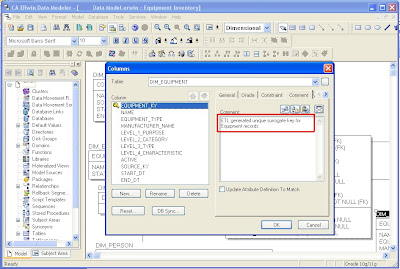
Step 1: Open your data model in CA ERwin Data Modeler and switch from the Logical view to Physical or Dimensional view. Enter the business description for each column into the corresponding “Comment” column property as shown below.
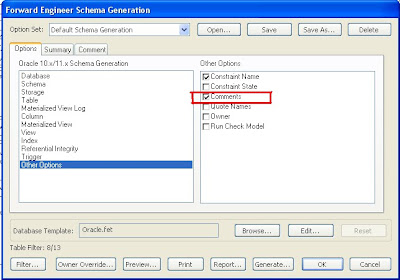
Step 2: If your target database server supports comments, ERwin can generate comments in the schema DDL script. In order to demonstrate this functionality, we will use ERwin’s Forward Engineer functionality to push our data model to an Oracle 11g database server. Make sure to check the “Comments” check-box under “Other Options” in the Forward Engineer Schema Generation wizard.
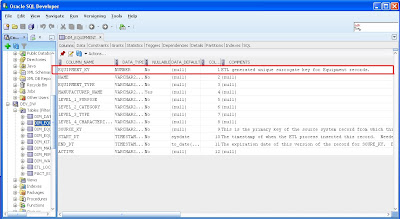
Step 3: The comments are now available in the database. The screenshot below shows that the comments are visible in Oracle’s SQL Developer. Thus, the data dictionary and all its business descriptions are now fully integrated into the meta data of the database objects.
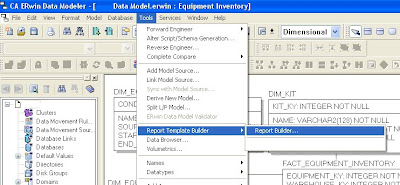
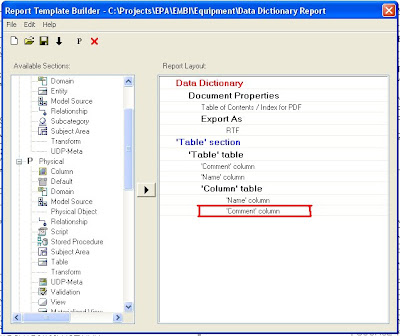
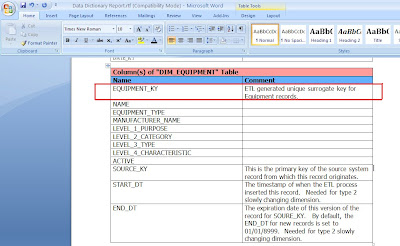
 Step 4: Use ERwin’s Report Builder to create a Data Dictionary document. Report Builder queries the ERwin data model to create high quality PDF, Word, XML, or HTML documents that can be used as client deliverables. The screenshots below show the basic steps and a sample RTF output file.
In summary, maintaining the business descriptions for data elements within the data modeling tool has the following advantages:
Step 1: Open your data model in CA ERwin Data Modeler and switch from the Logical view to Physical or Dimensional view. Enter the business description for each column into the corresponding “Comment” column property as shown below.
Step 2: If your target database server supports comments, ERwin can generate comments in the schema DDL script. In order to demonstrate this functionality, we will use ERwin’s Forward Engineer functionality to push our data model to an Oracle 11g database server. Make sure to check the “Comments” check-box under “Other Options” in the Forward Engineer Schema Generation wizard.
Step 3: The comments are now available in the database. The screenshot below shows that the comments are visible in Oracle’s SQL Developer. Thus, the data dictionary and all its business descriptions are now fully integrated into the meta data of the database objects.
Step 4: Use ERwin’s Report Builder to create a Data Dictionary document. Report Builder queries the ERwin data model to create high quality PDF, Word, XML, or HTML documents that can be used as client deliverables. The screenshots below show the basic steps and a sample RTF output file. In summary, maintaining the business descriptions for data elements within the data modeling tool has the following advantages:
- The business descriptions will only have to be maintained in one place (i.e. in the data modeling tool).
- The data dictionary is fully integrated into the meta data for database objects (if supported by the RDBMS).
- An official data dictionary document or web page can easily be created by the data modeling tool.
Thursday, August 19, 2010
OBIEE 11g is now available to the general public!
The much anticipated new release of OBIEE 11g was made available last weekend. Oracle has been discussing this product and the conversion of OBIEE and Hyperion on their product roadmap for a while and it has finally come to fruition. While there is certainly more to come in terms of this integration, Oracle has taken giant steps forward with this release of OBIEE.
Guident attended an exclusive Partner Briefing in Redwood Shores, the launch event in NYC and has been digesting the new features and functionality to understand its application for our customers. In short, we are impressed with this release and excited about the possibilities with OBIEE 11g.
Key features of this release include:
Guident attended an exclusive Partner Briefing in Redwood Shores, the launch event in NYC and has been digesting the new features and functionality to understand its application for our customers. In short, we are impressed with this release and excited about the possibilities with OBIEE 11g.
Key features of this release include:
- User Interface – the new 11g user interface is more intuitive and easier to use as it is now task oriented as opposed to product module oriented.
- Improved Visualization - Graphing and Mapping – 11g takes advantage of a new graphing engine, shared by the entire Fusion suite, providing a broader range of visually appealing, interactive charts and graphics. 11g also includes integration of GIS maps into the analytics through the use of Oracle MapViewer and Navteq map data.
- Integration with Hyperion – 11g makes it easier than ever to report from an Essbase cube and to push data into an Essbase cube. It also provides calculation capabilities and hierarchical analytical capabilities that were previously only available with an OLAP tool.
- Action Framework – 11g provides a revolutionary ability to move from insight to action through the use of richer guided analytics capabilities. 11g enables the seamless integration of external processes (e.g. SOA and BPEL workflow) within a BI analytic object. (e.g. call a process to place a Credit Hold directly from a report of Days Sales Outstanding).
- Scorecarding – 11g provides new capabilities to provide strategy maps, cause and effect diagrams, and track targets, actual and variances for KPIs.
- Smooth Upgrade – 11g requires a relatively easy upgrade as opposed to a full migration process.
Wednesday, August 18, 2010
Multi-Developer OBI EE Environments
In an environment with more than two or three OBI EE developers, it becomes increasingly difficult to coordinate and control code changes and updates to the OBI EE catalog, repository, and BI Publisher XMLP content. The larger the development team, the more likely the chance of two developers updating the same report and inadvertently overwriting each other’s work.
Often, some type of control is enforced by dividing the content into separate areas of responsibility. For example, developer 1 is responsible for maintaining the repository, developer 2 is responsible for all accounting reports, and so on. However, this approach makes resource utilization planning difficult for project managers since work-loads are never equally distributed across the areas of responsibility.
Since OBI EE has no built-in source code control capability, one has to look for third party software that can add this capability to an OBI EE development environment. There are several options including Microsoft Visual SourceSafe, CVS, and Tortoise Subversion (TortoiseSVN), which is an open source version control tool that can be downloaded for free at http://tortoisesvn.net/.
Regardless of the tool, the solution boils down to version control on the OBI EE content files as depicted in the diagram below.
Often, some type of control is enforced by dividing the content into separate areas of responsibility. For example, developer 1 is responsible for maintaining the repository, developer 2 is responsible for all accounting reports, and so on. However, this approach makes resource utilization planning difficult for project managers since work-loads are never equally distributed across the areas of responsibility.
Since OBI EE has no built-in source code control capability, one has to look for third party software that can add this capability to an OBI EE development environment. There are several options including Microsoft Visual SourceSafe, CVS, and Tortoise Subversion (TortoiseSVN), which is an open source version control tool that can be downloaded for free at http://tortoisesvn.net/.
Regardless of the tool, the solution boils down to version control on the OBI EE content files as depicted in the diagram below.

Developers run local instances of the OBI EE environment on their own workstations. All files and subfolders in the OBI EE web catalog folder, the BI Publisher XMLP folder, and the repository files are placed under source code control in a central master repository. Each workstation has a local repository that is synchronized with the master repository via update, check-in, and check-out operations.
The development server, which is mainly used by the business analysts for testing, is another subscriber to the master repository. A simple update from the repository will deploy the most current version to the development server.
Once a developer has checked-out a file, the file is locked in the master repository and no other developer is allowed to change the file until it is checked in again. Thus, no longer can one developer inadvertently overwrite changes of another. In addition, this approach provides the capability to roll back the environment to a previous version.
Subscribe to:
Posts (Atom)