Maintaining an up-to-date Data Dictionary is an important but often neglected task of data modelers. The most critical success factor for maintaining an up-to-date Data Dictionary is the ability to associate data elements to their corresponding business description within the data modeling tool itself. We will demonstrate how this can easily be accomplished with Computer Associate’s ERwin Data Modeler.
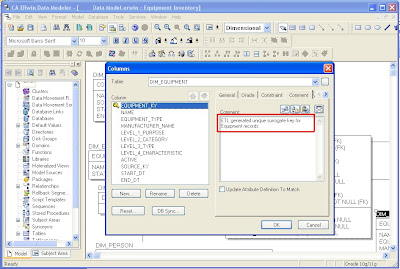
Step 1: Open your data model in CA ERwin Data Modeler and switch from the Logical view to Physical or Dimensional view. Enter the business description for each column into the corresponding “Comment” column property as shown below.
 Step 2:
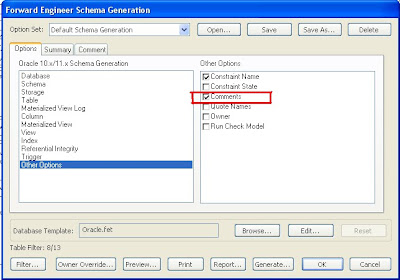
 If your target database server supports comments, ERwin can generate comments in the schema DDL script. In order to demonstrate this functionality, we will use ERwin’s Forward Engineer functionality to push our data model to an Oracle 11g database server. Make sure to check the “Comments” check-box under “Other Options” in the Forward Engineer Schema Generation wizard.
 Step 3:
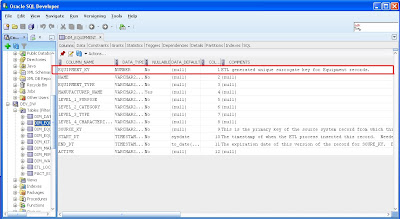
 The comments are now available in the database. The screenshot below shows that the comments are visible in Oracle’s SQL Developer. Thus, the data dictionary and all its business descriptions are now fully integrated into the meta data of the database objects.
 Step 4:
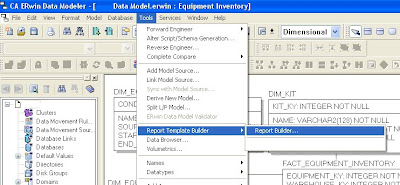
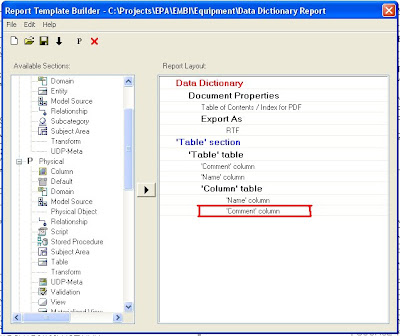
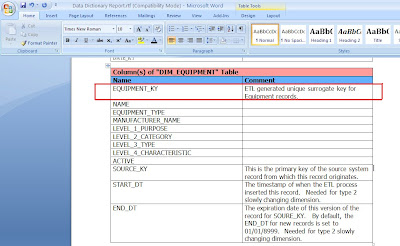
 Use ERwin’s Report Builder to create a Data Dictionary document. Report Builder queries the ERwin data model to create high quality PDF, Word, XML, or HTML documents that can be used as client deliverables. The screenshots below show the basic steps and a sample RTF output file.
In summary, maintaining the business descriptions for data elements within the data modeling tool has the following advantages:
- The business descriptions will only have to be maintained in one place (i.e. in the data modeling tool).
- The data dictionary is fully integrated into the meta data for database objects (if supported by the RDBMS).
- An official data dictionary document or web page can easily be created by the data modeling tool.


