Friday, April 8, 2011

Efficiently Integrate Google Web Toolkit (GWT) Widgets Across Multiple Platforms

Introduction

Google Web Toolkit (GWT) is an open source development toolkit for building web applications. GWT allows developers to write sophisticated AJAX applications in Java and then compile the source in optimized JavaScript that runs across all browsers. While Java delivers the benefits of “write once, run anywhere”, GWT creates the possibility of “write once, integrate anywhere”.

GWT can be used to develop fully functional UI widgets that interact with back-end services. Most often a GWT widget needs to be integrated into an application. If the application is also developed in Java, the integration is a simple matter of importing the widget's source code or JAR in class path. But what if the application is built with a non-Java platform, such as .NET? It is important to keep in mind that GWT compiles Java code into JavaScript and JavaScript can run in any browser. Therefore GWT widgets, as compiled in JavaScript, can be integrated into any browser-based web application.


StockWatcher [1] is likely to be the first example for most GWT developers. It is used here to demonstrate how GWT widgets can be integrated into web applications regardless of platform.


Local Mode

It is assumed that the steps in [1] are followed to create StockWatcher with client-side only Java code. Since there is no server-side code, the "WEB-INF" folder can be skipped or safely removed after GWT compiler compiles. The remaining component only consists of a set of static files, including JavaScript, CSS and other HTML resources. A copy of these files can be included as local resources in any web application to integrate StockWatcher. This is defined as "local" integration mode.


For example, Application ABC just needs to include three lines in one of its HTML files to integrate StockWatcher. In fact, the host page can be any typical web file such as JSP, ASP or ColdFusion, as long as its source is rendered as HTML in the end.


The integration is self-contained and non-intrusive. When opened in any browser, StockWatcher becomes a fully functional section within the host page. Apart from the three lines above to integrate the StockWatcher widget, the rest of the host page can include any content. The example here only has the text "My Application". No matter what it is, GWT widgets will co-exist with the rest of th
e page side by side.


When the application is running, server output shows that StockWatcher communicates with the quote server to receive updates. The callback parameter indicates that the communication is in JavaScript Object Notation, with padding (JSONP) format. See the following server log.


Remote Mode
In "Local" integration mode, applications obtain a copy of StockWatcher and refer to it as local resources. Unfortunately, this means that each application must update its local copy for every new release of StockWatcher. Just imagine if Google Maps were integrated in this way. An alternative is to host StockWatcher on a server and let all applications refer to it from this single remote entry point. This technique is defined as "Remote" integration mode. This mode centralizes and simplifies management of the widget.


The updated host page in My Application will refer to StockWatcher deployed on locahost at port 8080. Note that it uses the same three lines but different “href” and “src” values as compared to those of “Local” mode.


However, StockWatcher does not show up correctly (as expected) when opening the host page in the browser. A blank section is displayed instead. Close inspection finds the following lines in Firefox Error Console.


It turns out that cross-site behavior must be enabled for the communication to pass through. This is done by adding xs-linker in StockWatcher.gwt.xml.


Once StockWatcher is recompiled and redeployed, the host page opens up successfully in the browser and StockWatcher behaves the same as in "Local" mode. The quote server also shows the same output.


Summary
As shown, GWT widgets can be integrated in either "local" or "remote" mode into any web application. This can be achieved by developing client-side only Java code and using JSONP to overcome the Same Origin Policy (SOP) security constraint. In the case of "remote" mode, xs-linker needs to be added to enable cross-site behavior. Altogether, this proves to be an efficient way to reuse existing investments and opens the possibility to create some really interesting applications.


References

[1] StockWatcher, http://code.google.com/webtoolkit/doc/latest/tutorial/Xsite.html


[3] SOP, JSONP and XS Linker, http://code.google.com/webtoolkit/doc/latest/FAQ_Server.html

Tuesday, March 29, 2011

The Art of Identifying Meaningful BI Requirements

We have seen time and time again that the success of DW/BI implementations is dependent on the ability to identify BI requirements that have a measurable impact on the organization’s business decision making process (see our blog article “You just need three letters: WHY?”). However, identifying such requirements is a not a trivial process. A repeatable process is needed that is designed to keep the focus on the client’s business when developing business requirements for a DW/BI implementation. The following sections describe an overall approach with suggested techniques that we have used successfully.

Macro Level Understanding of Business

It is important to understand how your organization operates: how the business runs in order to make the best use of your BI capability. When you understand the key business processes and key business objectives, you can begin to drill down into more details that will provide not only reporting requirements, but also the data elements that are required to support those requirements.

Business Processes/Objectives

By understanding the business at a high level, you can begin to understand the business processes that support the organization. We need to understand what the key business processes are, then we need to understand how they work. We also strive to understand the core business objectives. Ultimately, all decisions that the customers make should support one or more business objectives. Once we identify business decisions, we can more easily identify detailed business questions and related data elements. The business questions will lead directly to specific reports or sets of reports. The data elements will support those reports and potential ad hoc analysis needs.

How to Implement

We can use the following tools and techniques to implement this requirements process. Background Research provides initial information about the nature of the business and its processes. It can help provide a preliminary list of decision centers, activities, and major decisions that are part of the organization you are focused on.

Structured Interviews should be used to build on the initial research you have gained. Seek out those who are knowledgeable of the organizational business processes. Through the interview process, the interviewer can gain information about problems, decisions, or critical success factors that are part of the running of the business. This high-level information can be used as a starting point in gathering more detailed requirements necessary for building a decision support system. Ask questions that lead the interviewee to indirectly identify information that supports decision-making. One approach is to ask the interviewee to identify the major business drivers that they are responsible for. Once these drivers are identified, ask them to identify the major decisions that they need to make to support those business drivers and one or more questions that they ask in the process of making each decision. Another approach is to ask your customer to identify the critical success factors they are responsible for. The individual should then be asked to identify for each critical success factor the information they need to ensure that the critical success factor is under control.

Joint Application Design (JAD) is a communal effort to further refine and agree on the hierarchy of business needs. When individuals are interviewed alone, they tend to respond to questions more or less in a vacuum; without the context of others’ views on how information is used. They also may have difficulty identifying a comprehensive set of answers to each question they are asked. A JAD session helps to elicit greater “thinking” by the participants as they hear other ideas and perspectives. A JAD session helps to bring out more decisions and business questions as more approaches are identified. The result: a more complete set of requirements upon which to build a BI system. The JAD session will be most successful if the right people are present. Individuals who have a solid understanding of each of the business processes to be covered, have the authority to make design decisions, and communicate well, should participate. The facilitator should be knowledgeable in BI system design as well as the business being supported. A JAD session should be held only after you have identified a baseline of business drivers, business decisions, and business questions based on information from the initial set of structured interviews and research.

Prototyping is a technique used after initial requirements have been established. Based on the information gathered from interviews and JAD sessions, you can develop an initial reporting database with limited BI reports. This gives you an opportunity to demonstrate the information and functionality of the reports to end users early in the development process. The feedback you received will help you to fine-tune your product early in the process so that the delivered product more closely meets your customer’s needs.

The figure below summarizes how a top-down approach will help to derive both reporting requirements as well as supporting data elements. For each business objective, there may be several business processes and decisions to support that objective. Each process and decision will involve business questions that need to be answered to support the process or decision. A business question may drive a specific report requirement. Meanwhile, each business question will require multiple data elements. By going through this process, you not only identify business-driven requirements for your BI system; you also keep the customer more heavily involved by forcing them to think critically about how their day-to-day decisions help drive the overall business. We have found these techniques to be successful using them in different combinations based on our client situation. How have these techniques worked for you? What other methods have you found valuable in driving requirements for your reporting initiatives?

Friday, March 4, 2011

Conditional Report Execution in OBIEE

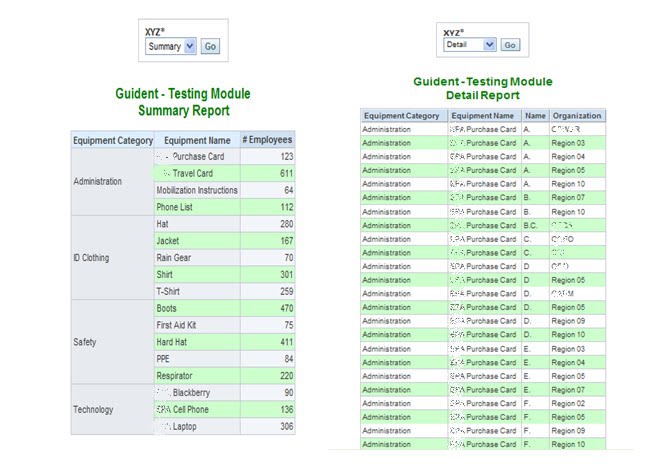
Here is a solution for providing conditional report execution based on prompt selection. For example, if a user chooses value ‘A’ in the prompt, then report ‘Report A’ should be executed. If a user chooses value ‘B’, then OBIEE should execute report ‘Report B’. In other words, the prompt will not be used as a filter but rather as a tool to conditionally execute reports. Here are the steps to implement conditional report execution: In this example, we want to conditionally execute the following two OBIEE reports: “Detail” and “Summary”. The prompt should determine which of these two reports should be executed. First, we have to create a prompt with two hard-coded values: "Detail" and "Summary". 'Detail' and "Summary" refer to the respective reports that we want to execute. We can select any column that is not being used in the report.

SELECT case when 1=0 then "Dim Credential"."Credential Type Level 1" else 'Detail' end FROM "Field Readiness" union all SELECT case when 1=0 then "Dim Credential"."Credential Type Level 1" else 'Summary' end FROM "Field Readiness"
The prompt will now look like this: Next we will have to create a new report "pqr" that we will use for guided navigation. This report must include a column that returns the constant value "Detail". We then create a filter on the column with a constant value "Detail" using presentation variable "xyz". This report will only return values when the prompt value is same as "Detail". Since we know the prompt has two values "Detail" and "Summary", this report will not return any record when the prompt value is set to "Summary". Next we have to go into the dashboard editor and create three sections, one for the prompt and one for each of the two conditional reports. We then click "Properties" on the Report 1 section and select "Guided Navigation" option. We now have to refer to the "pqr" source report as shown in the image below. Then click ‘Properties’ on Report 2 section and select ‘Guided Navigation’ option. When we open the new dashboard page, we can now test whether the conditional report execution is working. Please let us know if you have any questions.

Tuesday, February 15, 2011

OBIEE Dashboard for Informatica Metadata

The metadata that Informatica Power Center 8 retains in its repository can be exposed via OBIEE reports and dashboards. This metadata includes ETL execution statistics, which can provide valuable information to BI developers/Administrators and BI users alike. ETL execution metadata can expose performance bottlenecks, error-details, debugging information, and the last successful ETL load timestamp. The following steps demonstrate how to create an ETL Monitor Dashboard to expose Informatica metadata in OBIEE.

In this example, we will use the following four views from the Informatica schema:
  • REP_SESS_LOG
  • REP_SESS_TBL_LOG
  • REP_SUBJECT
  • REP_WFLOW_RUN
Steps to build the Informatica Metadata Reports using OBIEE:

Import the four views listed above into the OBIEE repository (RPD) and create the physical joins as shown below on SUBJECT_ID. Build the corresponding business model layer and presentation layer.

Now, you will be able to create ETL reports using OBIEE Answers. In this example, we have build reports to display the following information:
    • Last ETL completion Time Stamp
    • ETL Execution statistics
    • Number of Errors in the latest ETL Execution
    • Latest ETL Execution log (which will drill down to the individual interface log and also error detail
    • Error log (Table level)
The dashboard screenshot below shows our implementation of these reports.Last ETL completion Time Stamp: Data Current as of [MAX (REP_WFLOW_RUN.END_TIME)]: This report shows the latest ETL execution completion time stamp.ETL Execution Statistics: This report shows processing time for the last n ETL executions. The graph is plotted by the date when ETL ran and the duration of each ETL run (in Minutes).

Number of Errors in the latest ETL Execution: This report gives the number of errors encountered in the last n ETL executions.Last ETL Execution Log: This report shows the ETL execution log of the last ETL run. We have designed this report to include several drill-down options as shown below.

Error Log report:
We can also use Informatica Metadata tables for Impact Analysis & Security Analysis using the following views / tables:
Impact Analysis:
  • REP_TASK_ATTR
  • REP_SUBJECT
  • REP_SESSION_INSTANCES
  • REP_ALL_TASKS
  • REP_WORKFLOWS
  • OPB_MAPPING
  • OPB_WIDGET_INST
Security Analysis:
  • REP_VERSION_PROPS
  • REP_USERS
  • REP_SUBJECT


Click here to see how to expose Oracle Data Integrator (ODI) ETL metadata.


If you have question or comments, leave a comment below.

Monday, January 31, 2011

Bing Map Integration with OBIEE 11g

As in OBIEE 10g, OBIEE 11g provides the ability to integrate Bing maps in the presentation layer through HTML and Java Script in the Narrative view. This blog demonstrate this functionality. In the example below, we will plot cities on a Bing map with conditional icons based on profit amounts (blue and red). This demo uses custom data but can be further extended to use real data sets.
Here are the steps to integrate Bing maps:

1. Create a new report that includes city, state, latitude, longitude, and the profit amount measure.
2. Format the columns Latitude and Longitude to have at least 6 decimal places to ensure precise plotting on the map.

3. Now in the Results tab, add the Narrative view to include the custom Java Script shown below. In the Prefix section call the Bing map API and declare the required variables. In our case we used arrays to hold the latitude, longitude and profit.
var v_lat = [];
var v_long = [];
var v_profit = [];
4. In the Narrative section, pass the required columns with @{column_location} with Latitude and Longitude. In our example we have passed Latitude (@4), Longitude (@5) and Profit (@3).

v_lat.push(@4);
v_long.push(@5);
v_profit.push("@3"); // The added "$" makes profit a string value.
5. Define the following two functions in the Postfix section:
GetMap(): Sets the default settings for the map (like 2D mode), initial location (init_x1), default view to Road, and map zoom size to 4.

AddShapes01(): Loops through the array length and drops the push pin icons (custom icons) for each latitude and longitude, and their respective title.
6. Check the “Contains HTML Markup” in the Narrative.

The image below shows the table view and the Narrative View in the dashboard.

Feel free to contact us with questions.

Thursday, January 13, 2011

OBIEE Data-Level Security with a Twist

Row-level data security can be enforced in the RPD by filtering column values based on role membership of the user. With this approach, users can only retrieve records (i.e. rows) to which they have access to. In other words, users only have access to a subset of records.

We have encountered the following data-level security requirement that needs a different approach: Our client’s organization was divided into several geographic regions. Members of one region had to be able to see all summary-level data for ALL regions but were only allowed to see detail-level data of their own region.

The organization was divided into 10 regions and the OBIEE implementation was to measure sales revenue generated by sales persons associated to these regions. All users, regardless to which region they belonged, had to be able to see the sales revenue numbers for all regions. However, they were not allowed to see the names of the sales persons from other regions. In this scenario, the standard row-level security approach did not work since it would have prevented the users from having access to the summary level data for all regions. After all, all records would have been filtered by their own region by design. Therefore, records from other regions would have been invisible.

The solution required the following alternate approach: Instead of filtering data rows we had to implement conditional data masking based on role membership.

We have implemented the solution as follows:

1) We configured OBIEE to use the client’s enterprise LDAP as its authentication source.

2) We then created the following new LDAP groups and assigned users to their appropriate group:

□ ORCL_BI_EMBI_Region_1_Restricted_Data
□ ORCL_BI_EMBI_Region_2_Restricted_Data
□ ORCL_BI_EMBI_Region_3_Restricted_Data
□ …
□ ORCL_BI_EMBI_Region_10_Restricted_Data
□ ORCL_BI_EMBI_HQ_Restricted_Data (people in this group should be able to see all detail data)

3) We created a GROUP session variable in the INIT BLOCK of the RPD to hold all LDAP group names to which the current users belongs.

4) All sales person attributes were stored in the DIM_RESPONSIBLE_PERSON dimension table. In order to simplify the data-level security logic in the RPD, we have added an additional column “LDAP_GROUP_NAME” to this dimension table. The ETL process populates the LDAP_GROUP_NAME based on the region membership of the sales person.


5) We then created new logical columns in the DIM_RESPONSIBLE_PERSON table in the RPD’s business layer to include the conditional data masking logic. For example, the code for the new logical FirstName column looked like this. We have added the ORCL_BI_EMBI_HQ_Restricted_Data group to allow HQ users to see all data:

CASE
WHEN LOCATE('ORCL_BI_EMBI_HQ_Restricted_Data', VALUEOF(NQ_SESSION."GROUP")) > 0
THEN EMBI."DimResponsible Person"."First Name1"
WHEN LOCATE(EMBI."Dim Responsible Person".LDAP_GROUP_NAME, VALUEOF(NQ_SESSION."GROUP")) > 0
THEN EMBI."Dim Responsible Person"."First Name1"
ELSE '*****'CAST (EMBI."Dim Check In Out Person"."Person Ky" AS CHARACTER ( 30 ))
END

6) When logging into OBIEE as a Region 6 user, one will see all summary data for all regions und detail-level data for region 6 only as seen in the screenshot below.

Tuesday, January 11, 2011

How to Protect High Value Project Resources

Improving a PMO with Project Portfolio Management 
The IT PMO of a large organization was suffering from failing projects. The issues facing the organization were:

  • Continuous mergers and acquisitions resulted in stove-piped, independent businesses with no incentive to work toward common goals, 
  • Division between Business and IT, 
  • Resistance to change, 
  • No application/ systems standards (multiple solutions for the same capability), 
  • No view of resource capacity/ demand, 
  • No single view of all projects, 
  • Failing projects. 


The Problem
Important projects were not getting done. With no prioritization and no view of true resource demand/ capacity, low-value projects were gobbling up resources needed by high-value projects. This caused the more valuable projects to be stalled or stopped in mid-implementation. This also resulted in corners being cut when project managers tried to shotgun projects through the lifecycle to ensure they did not lose precious resources. Project planning was one key phase that was shortened or skipped altogether, leading to a higher rate of project failure.

Projects under a certain budget limit could be submitted and were automatically put in the project queue to be resourced within a week. Anyone could submit a project request and provide very minimal supporting information.

What Didn’t Work
The organization had tried different methods for prioritizing (such as having the head of finance label projects as high-, medium-, or low-priority). However, these methods yielded only top-priority rankings for virtually all projects.

For higher cost projects, IT Governance did exist. In the fall of each year, the IT site directors would provide business case information for projects they wanted to implement in the coming year. The regional leader would review and accept the projects he or she deemed priority for the site; and an oversight committee eliminated additional projects from the plan to lower the total site budget to match what they could allocate. The results of these meetings determined each site’s budget. In the following year, the sites were free to substitute other projects for those that had been approved, making this an exercise in obtaining funding, not in proper portfolio planning.

The Fix
The PMO leaders determined that the two main issues to be resolved were lack of resource management and prioritization. They concluded that implementing project portfolio management could resolve both issues and result in successful planning and project management.

The goals for the Portfolio Management implementation were as follows:

  • Tie projects to the corporate strategy,
  • Develop business cases for all proposed projects, 
  • View projects across all sites to determine opportunities to combine efforts,
  • Improve project planning, 
  • Develop solutions standards: 
    • Catalog accepted applications for specific capabilities. 

They developed a model for scoring project requests which would serve as the basis for prioritization. The model was based on research of best practices in the industry and tied to the organization’s strategy. Once the model was in place, it was used to prioritize the projects submitted for the yearly budget to demonstrate to the decision makers why they should fund the proposed projects. They now had clear insight into what should be done (prioritization) ) and what could be done (resource management). Including portfolio management in the project lifecycle greatly improved the organization’s ability to successfully implement projects. It is well known that Portfolio Management is intended to maximize the benefit from an organization’s portfolio of projects; but it also helps ensure project success by “sizing” the portfolio to fit the available resources.

With Guident’s scoring model development and our portfolio management best practices, we can help you improve your Project Management success rate. Your portfolio of projects will also be better aligned to achieve your strategy and provide maximum return.